
The SignupPassword class implements the signup-password screen functionality. This screen collects the user’s password.

Constructors

Create an instance of SignupPassword screen manager
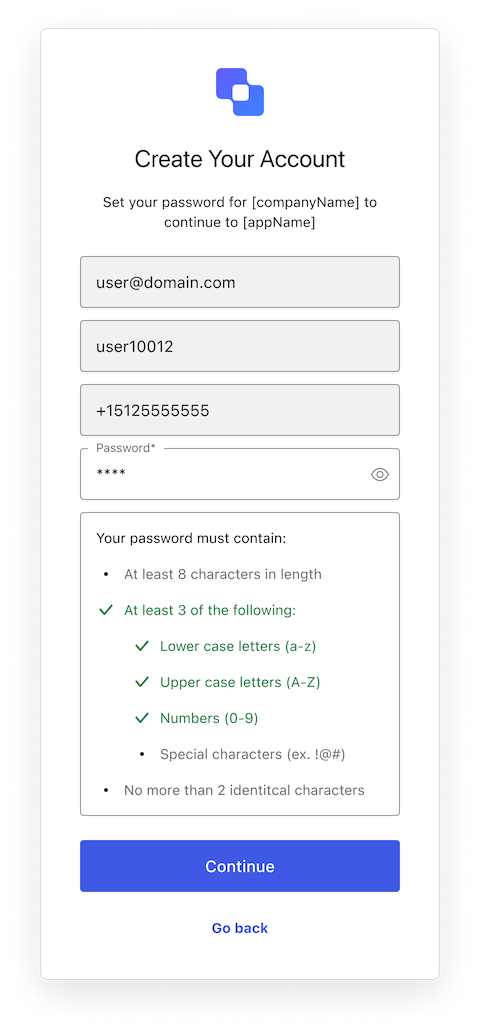
Signup Password with Flexible IDs
Example
import SignupPassword from "@auth0/auth0-acul-js/signup-password";
const signupPasswordManager = new SignupPassword();
const validationResults = signupPasswordManager.validatePassword('MyP@ssw0rd!');
console.log(validationResults);
// [
//   { code: 'password-policy-length-at-least', policy: 'At least 12 characters', isValid: false },
//   { code: 'password-policy-lower-case', policy: 'Lowercase letters (a-z)', isValid: true },
//   ...
// ]

Properties

branding
Provides branding-related configurations, such as branding theme and settings.
client
Provides client-related configurations, such as id, name, and logoUrl, for the login screen.
organization
Provides information about the user’s organization, such as organization id and name.
prompt
Contains data about the current prompt in the authentication flow.
screen
Contains details specific to the signup-password screen, including its configuration and context.
tenant
Contains data related to the tenant, such as id and associated metadata.
transaction
Provides transaction-specific data for the signup-password screen, such as active identifiers and flow states.
untrustedData
Handles untrusted data passed to the SDK, such as user input during login.
user
Details of the active user, including username, email, and roles.

Methods

federatedSignup
(options ?)
This methods handles allows signup via different social identifiers. For example: Google, Facebook etc.
Example
import SignupPassword from "@auth0/auth0-acul-js/signup-id";

const signupIdManager = new SignupPassword();
const { transaction } = signupIdManager;

//get social connections
const socialConnection = transaction.alternateConnections; //eg: "google-oauth2"

const signupParams = {
 connection : socialConnection[0].name, // "google-oauth2"
};

signupIdManager.federatedSignup(signupParams);
Method Parameters
getErrors
This method retrieves the array of transaction errors from the context, or an empty array if none exist. An array of error objects from the transaction context.
signup
(options ?)
This methods handles signup-password related screen configuration. It allows to proceed with registering signup password along with signup identifiers passed in previous screen
Example
import SignupPassword from "@auth0/auth0-acul-js/signup-password";

const signupPasswordManager = new SignupPassword();
const { transaction, screen } = signupPasswordManager;

//get mandatory & optional identifiers required for signup-password screen to proceed
const mandatoryIdentifier = transaction.getRequiredIdentifiers(); //eg: email
const optionalIdentifiers = transaction.getOptionalIdentifiers() //eg: phone

//get signup data submitted on previous screen from previous screen
const data = transaction.screen.getScreenData(); //eg: email, phone

const signupParams = {
 email : data.email,
 password: "******"
};

signupPasswordManager.signup(signupParams);
Method Parameters
validatePassword
This method validates a password string against the current transaction’s password policy. This method retrieves the password policy from the current transaction context and delegates the actual validation to coreValidatePassword.It returns an array of validation results, each containing:
  • code: the identifier of the password rule,
  • policy: a user-friendly description of the rule,
  • isValid: boolean indicating if the password passed that rule.
Example
import SignupPassword from "@auth0/auth0-acul-js/signup-password";
const signupPasswordManager = new SignupPassword();
const validationResults = signupPasswordManager.validatePassword('MyP@ssw0rd!');
console.log(validationResults);
// [
//   { code: 'password-policy-length-at-least', policy: 'At least 12 characters', isValid: false },
//   { code: 'password-policy-lower-case', policy: 'Lowercase letters (a-z)', isValid: true },
//   ...
// ]
Method Parameters