
The SignupId class implements the signup-id screen functionality. This screen collects the user’s identifier.
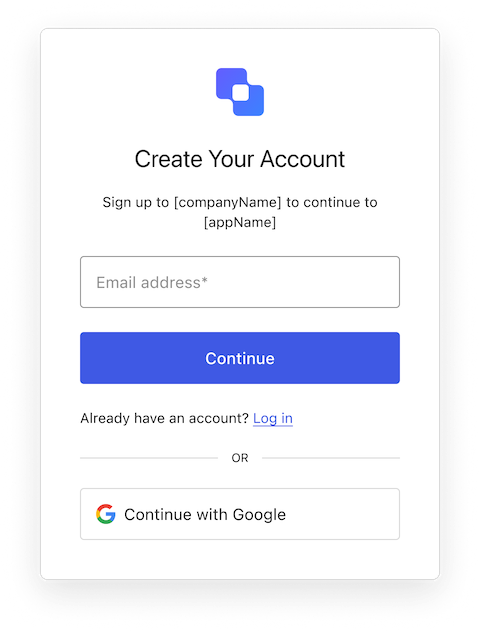
Signup ID

Constructors

Create an instance of SignupId screen manager
Example
import SignupId from "@auth0/auth0-acul-js/signup-id";
const signupIdManager = new SignupId();
const { transaction } = signupIdManager;
//get mandatory & optional identifiers required for signup
const mandatoryIdentifier = transaction.getRequiredIdentifiers(); // eg: email
const optionalIdentifiers = transaction.getOptionalIdentifiers() // eg: phone
const signupParams = {
 email : "testEmail",
 phone : "+91923456789"
};
signupIdManager.signup(signupParams);

Properties

branding
Provides branding-related configurations, such as branding theme and settings.
client
Provides client-related configurations, such as id, name, and logoUrl, for the login screen.
organization
Provides information about the user’s organization, such as organization id and name.
prompt
Contains data about the current prompt in the authentication flow.
screen
Contains details specific to the signup-id screen, including its configuration and context.
tenant
Contains data related to the tenant, such as id and associated metadata.
transaction
Provides transaction-specific data for the signup-id screen, such as active identifiers and flow states.
untrustedData
Handles untrusted data passed to the SDK, such as user input during login.
user
Details of the active user, including username, email, and roles.

Methods

federatedSignup
(options ?)
This method handles allows signup via different social identifiers. For example: Google, Facebook etc.
Example
import SignupId from "@auth0/auth0-acul-js/signup-id";

const signupIdManager = new SignupId();
const { transaction } = signupIdManager;

//get social connections
const socialConnection = transaction.alternateConnections; //eg: "google-oauth2"

const signupParams = {
 connection : socialConnection[0].name, // "google-oauth2"
};

signupIdManager.federatedSignup(signupParams);
Method Parameters
getErrors
This method retrieves the array of transaction errors from the context, or an empty array if none exist. An array of error objects from the transaction context.
getSignupIdentifiers
This method returns the list of enabled identifiers for the signup-id form, marking each as required or optional based on transaction config. An Array of identifier objects (e.g., email, phone, username).
Example
const signupId = new SignupId();
const identifiers = signupId.getSignupIdentifiers();
// [{ type: 'email', required: true }, { type: 'username', required: false }]
pickCountryCode
(options ?)
This method redirects the user to the country code selection list, where they can update the country code prefix for their phone numnber.
Example
import SignupId from "@auth0/auth0-acul-js/signup-id";
const signupIdManager = new SignupId();

signupIdManager.pickCountryCode();
Method Parameters
signup
(options ?)
This methods handles signup-id related configuration. It allows to signup new users via different identifiers.
Example
import SignupId from "@auth0/auth0-acul-js/signup-id";

const signupIdManager = new SignupId();
const { transaction } = signupIdManager;

//get mandatory & optional identifiers required for signup
const mandatoryIdentifier = transaction.getRequiredIdentifiers(); // eg: email
const optionalIdentifiers = transaction.getOptionalIdentifiers() // eg: phone

const signupParams = {
 email : "testEmail",
 phone : "+91923456789"
};

signupIdManager.signup(signupParams);
Method Parameters
validateUsername
This method validates a given username against the current username policy defined in the transaction context. It returns an object indicating whether the username is valid and why.
Example
const signup = new Signup();
const result = signup.validateUsername('myusername');
// result => { valid: true, errors: [] }
Method Parameters